A client report is the most valuable thing a coach writes. Done well, it is the document a client keeps. Done at eleven at night, after four sessions, it is the reason coaches take fewer clients than they could.
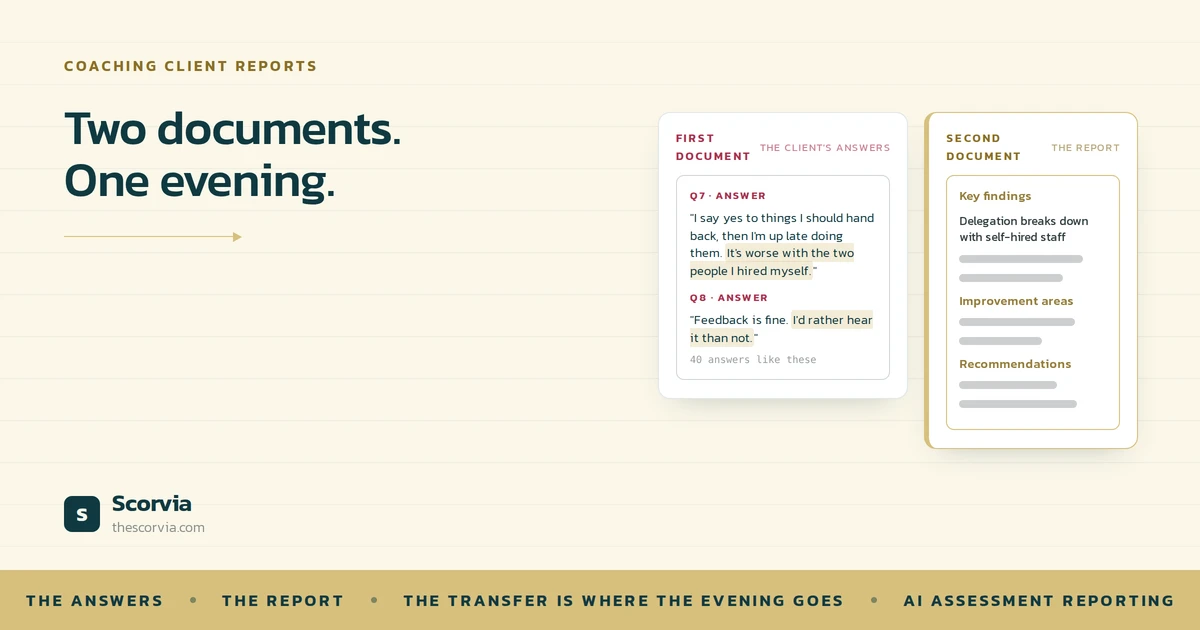
Put simply, a client report is a second document written from a first one.
That sentence is the whole explanation. Here is what it means, why it takes so much time, how to tell which part of the work is really yours, and how Scorvia's assessment reporting removes the part that is not.
What is a client report, really?
A structured reading of what the client told you. To summarize, they can take immediately, the findings organised into themes, what is working, what is not, and what to do next.
Every coach's version has those parts, whatever they are called. And every one of them is built from a first document: the client's answers, in the client's words, in an intake form or an assessment or your notes.
The report does not add new information. It adds order and judgement to information that already exists.
Why does it take so long?
Think of a translator who is handed a letter and asked to translate it. Before they can begin, they must copy every letter out by hand every line into a new notebook. Only then can they start the actual translating.
Nobody would run a translation service that way. But it is how most client reports are written.
You open the client's answers in one window and a blank report in another. You read an answer, decide where it belongs, and retype the gist of it under a heading. Then the next one. Forty answers later, the report has a shape, and you have not yet done any coaching.
That copying is the transfer. It is slow, it is mechanical, and it comes first so by the time you reach the part only you can do, the evening is mostly gone.
The judgement is fast. The transfer is slow. And the transfer always comes first.
How to tell which part of the work is yours
Writing a report is three jobs wearing one name. Pull them apart and it is obvious where the time goes.
Transfer
Moving what the client said from where they said it to where the report needs it. Reading the answers, copying the phrases, retyping the examples. No judgement involved.
Structure
Deciding what goes under which heading: what is a finding, what is a strength, what is an area to work on. A template can do most of this and usually does.
Judgement
Reading the answers as the coach who knows this person and saying what they mean. The only job of the three that needs you, and the one that gets the least time.
Here is the test for any sentence in a report you are writing. Could it have been passed from the client's answer? That is transfer. Could a template have decided where it goes? That is structure. Does it need you to have met this person? That is judgement.
Most coaches find the third kind is a few sentences per section. The rest was carrying.
Where the transfer happens in Scorvia
In Scorvia, the transfer happens now a client submits their assessment before you open anything.
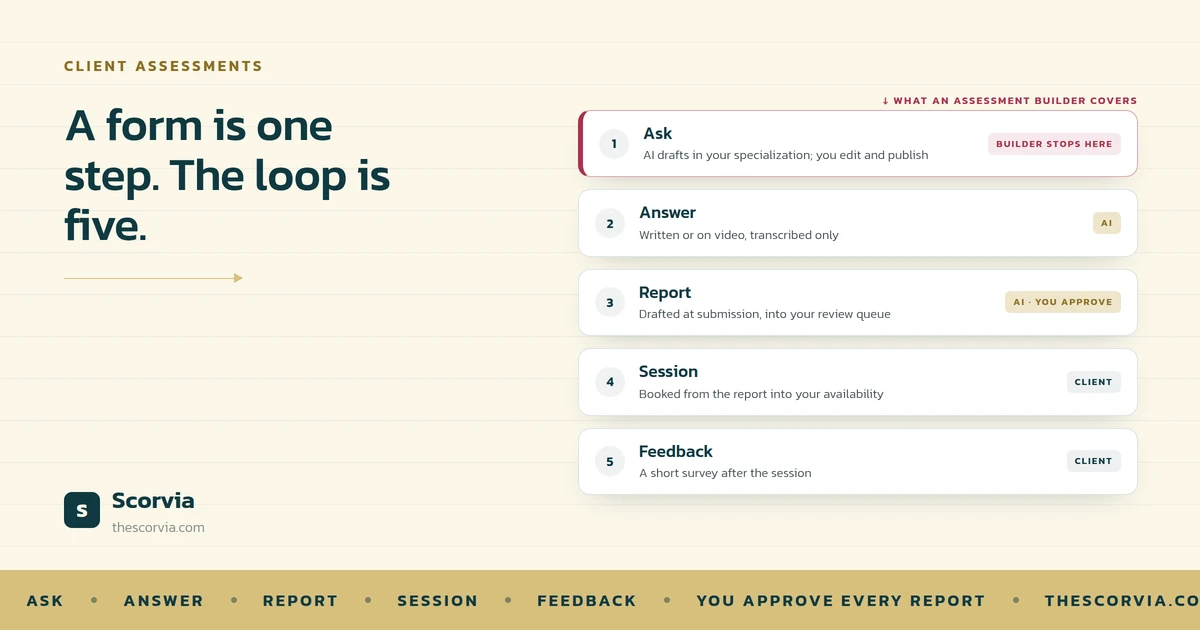
The client's answers become a drafted report in five sections: executive summary, key findings, strength areas, improvement areas, recommendations. It lands in your review queue, marked pending review. It does not land in the client's inbox.
If the assessment was scored, the draft carries the marks: an overall score out of 100, and a chart. One category gives a pie chart. Two or more give a bar chart, one bar per category, and clicking a bar shows that category's questions and the client's answers.
So when you open the report, the first document is already inside the second. The transfer and most of the structure are done. What is left is the job that was always yours.
| What you can do with the draft | What it means |
|---|---|
| Edit by hand | Every section opens as text. Change anything. |
| Edit with AI | Pick one section and say how to redraft it. Only that section changes. |
| Roll back | Every version is kept from the first draft on. |
| Add a coach note | Your words, at the top of what the client reads. |
| Preview of the client version | The same report in the second person, addressed to them. |
| Approve and send | Nothing reaches the client until you do this. |
A closer look: the recommendations section
Recommendations is the section clients quote back to you. It is also the section most likely to need your voice rather than a draft.
Say the draft's recommendations are right but too brisk for a nervous first-timer. You do not rewrite the report. You pick that one section, tell the AI to soften it and slow it down, and read what comes back.
The summary, the findings, the strengths and your coach note are untouched. If the rewrite is worse, the previous version is still there. If it is better, you approve.
That is the transfer removed and the judgement kept. Ten minutes on the one section that needed you, instead of an hour getting to it.
With great power: the draft is not the report
A draft written the instant a client submits is a powerful thing, and the temptation is to trust it.
Do not. The draft knows the answers. It does not know the client. It has not sat across from them for four sessions, and it does not know that “I am fine with feedback” was said through gritted teeth.
That is why the draft goes to your queue and not to the client, why the client sees an Under Review badge while it is with you, and why nothing goes out under your name until you have read every line and approved it.
Removing the transfer gives you the evening back. It does not remove you.
The AI does the carrying. You do the coaching. The approval step is where the two meet.
Common questions
Why does writing a client report take so long?
Because the report is a second document written from the first one. Most of the time goes on moving what the client said into the shape of a report reading, copying, retyping before any coaching judgement happens. The transfer is slow and the judgement is fast, and the transfer comes first.
What should a coaching client report contain?
A summary the client can read in a minute, the findings organised into themes rather than listed back question by question, what is working, what is not, and what to do next. In Scorvia those are the five sections of every drafted report: executive summary, key findings, strength areas, improvement areas and recommendations.
Can AI write a coaching report?
AI can write the first draft from the client's answers, and that is what Scorvia does the moment a client submits. It cannot know the client. The draft lands in your review queue, not the client's inbox, and nothing reaches the client until you have read it, edited what needs editing and approved it.
What is the difference between editing a report manually and editing it with AI?
Manual editing opens a section as text, and you change it yourself. AI editing lets you pick one section and tell the AI how to redraft it softer, shorter, more detail and only that section changes. Every other section and your coach note stay exactly as they were, and every version is kept so you can roll back.
Does the client see the report as soon as it is drafted?
No. A drafted report is marked pending review and sits with you. The client sees an Under Review badge, so they know the work is happening, and they get the report only after you approve it with your note at the top, your logo on it, and a PDF to download.
The report drafting, the two edit modes, the version history and the approval step are all part of AI-driven assessment reporting in Scorvia. The full description is on the feature page. If you want the problem-led version of this argument, read Between Submit and Send.
Build one assessment, have one client submit, and open the draft that is waiting. 14-day free trial, no card see /features/ai-assessment-reporting, or /pricing.