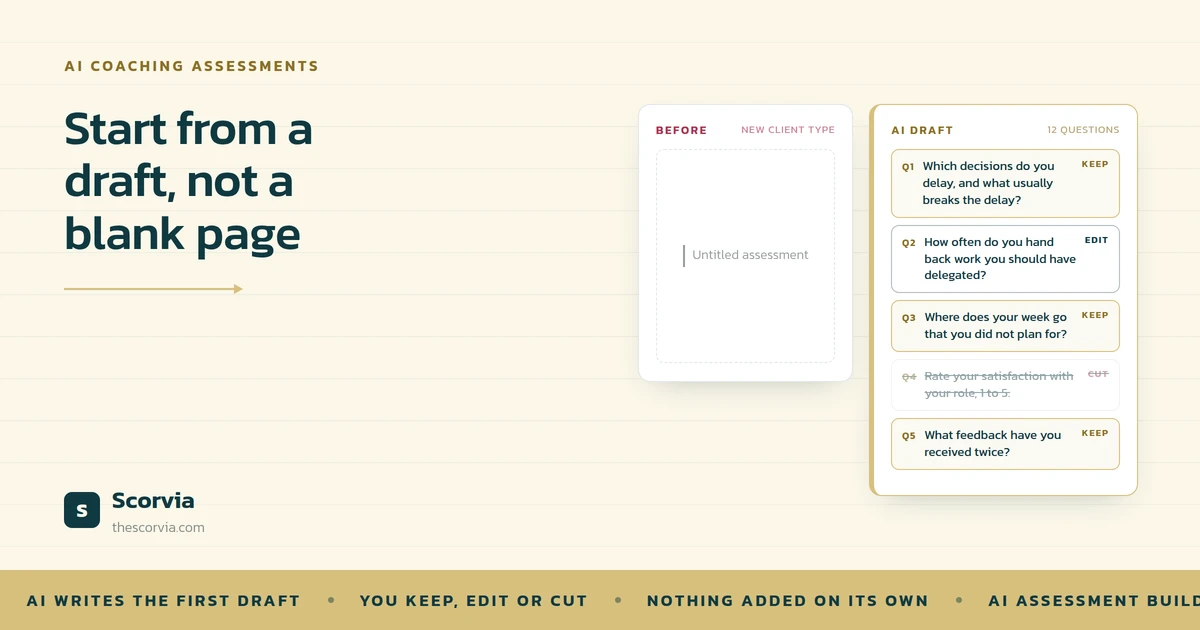
AI helps coaches write assessments faster by drafting the first version of the question set in the language of the coach's specialization. The coach then keeps, edits or removes each question, adds scoring and branching where they make sense, previews the whole set and publishes it. The time saved is the blank page; the judgement about what to ask stays with the coach.
Every coach has written an assessment from a blank document. It takes an evening, it comes out fine, and next month a new client type needs a different one, so it happens again.
Put simply, AI helps by writing the first draft in your field's language, so you start from something to edit rather than nothing to fill.
That one sentence is most of the answer. Here is what it means, why the first draft is where the time goes, how to judge what the AI gives you, and how it works in Scorvia's assessment builder.
What is an AI-drafted assessment?
A question set written by AI for a specific specialization, which the coach then edits, scores, orders and publishes.
The word that matters is specialization. A generic assessment tool gives everyone the same questions. An AI-drafted one is told what field you work in executive coaching, nutrition, HR, recruitment and writes the questions in the vocabulary those clients actually use.
It is a draft. Not a finished assessment, and not one that goes anywhere without you. You keep, edit or throw out every line.
Why the first draft is where the time goes
Think of a tailor. Given a bolt of cloth, they spend the first hour measuring and marking before a single cut. Given a pattern already in the customer's size, they start cutting.
The skill is the same. The hour is different.
Writing an assessment from nothing is the bolt of cloth. You are deciding what to ask, how to phrase it, what order it goes in, and what a good answer looks like, all at once, on a blank page. Most of the evening goes on getting to the point where there is something to react to.
An AI draft is the pattern. Twelve questions, phrased for your field, already in an order. Now the work is reacting: this one stays, this one is wrong for my clients, this one needs the word they would use. That is fast, because reacting is what a coach is good at.
The AI does the part that needed a blank page. You do the part that needed you.
How to judge what the AI gives you
Here is the test for every drafted question. Would you ask this client this question, in these words, in a session?
If yes, keep it.
If you would ask it but not like that the phrasing is off, the example is wrong for your market edit it. This is most of them, and it takes seconds per question.
If you would never ask it, throw it out. A draft that needs three questions deleted is still faster than a page that needed twelve written.
One more check: is there a question you always ask that is missing? Add it. In Scorvia your past questions are offered back to you for the specialization you are building, so adding it is a drag, not a rewrite.
Where the first draft lives in Scorvia
In Scorvia, you set your industry and pick every specialization you work in. The AI writes each set of questions to the specialization it belongs to. If yours is not on the list, you request it from your profile and an admin reviews it.
From there the builder works the way a document does. Three question types multiple choice, true/false and open text mixed in one assessment. Reorder, edit and delete by drag and drop. Preview the whole set, with its scoring and branching laid out, before anyone gets a link.
| What the AI drafts | What you decide |
|---|---|
| The questions, in your specialization's language | Which stay, which change, which go |
| Marks on multiple-choice and true/false options | The scheme — what a mark means, and whether a question is scored at all |
| A path a client takes when an answer changes it | Whether to branch, and where the path leads |
| Nothing else | Everything else. Nothing is added to your assessment on its own |
The drafts also drift toward your voice. What you keep and what you dismiss feeds the next batch, so the suggestions get closer to how you write. That is the only sense in which the system learns from you; no model is trained on your content.
A closer look four places the time actually goes
Writing an assessment is four smaller jobs. AI takes the first pass at each.
1. The first draft, in your field's language
You set your industry and specializations, and the AI drafts each question set in the vocabulary those clients use. The blank page is gone before you start.
2. Scoring suggested with the question
Multiple-choice and true/false options can carry a mark, so the report can show scores and charts. You change the marks; you do not invent the scheme.
3. Branching offered where an answer changes the path
A multiple-choice or true/false answer can send a client down a different route. Twelve questions that adapt beat forty that do not.
4. Your own questions, offered back
Questions you have used before are offered for the specialization you are building. Drag one in rather than writing it twice.
With great power: the draft is not the assessment
A question set that appears in seconds is a powerful thing, and the temptation is to publish it as it came.
Do not. The AI knows the field. It does not know your clients, your programme, or the question that always opens the real conversation. The draft is the pattern, not the suit.
That is why nothing is added to your assessment on its own, why you preview the whole set before a link exists, and why the questions you keep over time shape the drafts you get next. The speed is real. It is speed in editing, not speed in skipping the editing.
AI writes the first draft. You write the assessment. Publish only what you would ask.
Common questions
How can AI help coaches write assessments faster?
By writing the first draft. You name the field you work in, the AI drafts a question set in that field's language, and you keep, edit or throw out each question. The time you save is the time you used to spend facing a blank page; the judgement about what to ask stays yours.
Does the AI write generic questions?
Not if it knows the specialization. In Scorvia you pick the industry and every specialization you work in, and each set is drafted for that specialization in the words those clients actually use. If yours is not listed you can request it from your profile, and an admin reviews the request.
Can I change the questions the AI suggests?
All of them. Reorder, edit, delete, or replace with a question from your own library. Nothing is added to your assessment on its own, and nothing goes to a client until you have previewed the whole set with its scoring and branching and published it.
Does the AI learn from my assessments?
Only in one narrow way: what you keep and what you dismiss feeds the next batch of suggestions, so drafts drift toward how you write. That is a preference signal, not a training set. No model is trained on your questions, your assessments or your clients' answers.
What kinds of questions can an AI-drafted assessment include?
Multiple choice, true/false and open text, mixed in one assessment. A multiple-choice question can accept more than one answer, and any multiple-choice or true/false option can be scored. Open text stays unscored, because a paragraph is not a number.
The AI-assisted builder, the question library and the specialization list are part of Scorvia's assessment builder. The full description is on the features page and the AI assessment templates page. If you want the problem-led version of this argument, read The Assessment You Rebuild Every Time.
Name one specialization, read the draft, and count how many questions you would keep. 14-day free trial, no card see /features/ai-assessment-templates, or /pricing.