Conditional branching is a small feature with a large effect. Used well, it makes a five-question survey feel written for the person answering it. Used badly, it turns the same survey into a maze.
Put simply, branching is a survey that listens to the last answer before it asks the next question.
Here is what it is, why it works, how to know when a question should branch, and how it is built in Scorvia's survey and feedback builder.
What is conditional branching?
A rule that reads the answer a client just gave and uses it to choose the next question.
Without branching, a survey is a list. Question one, then two, then three, the same for everyone. With branching, the list gets a fork in it: if the answer was this, go here; if it was that, go there.
The client never sees the fork. They see a survey that seems to have heard them.
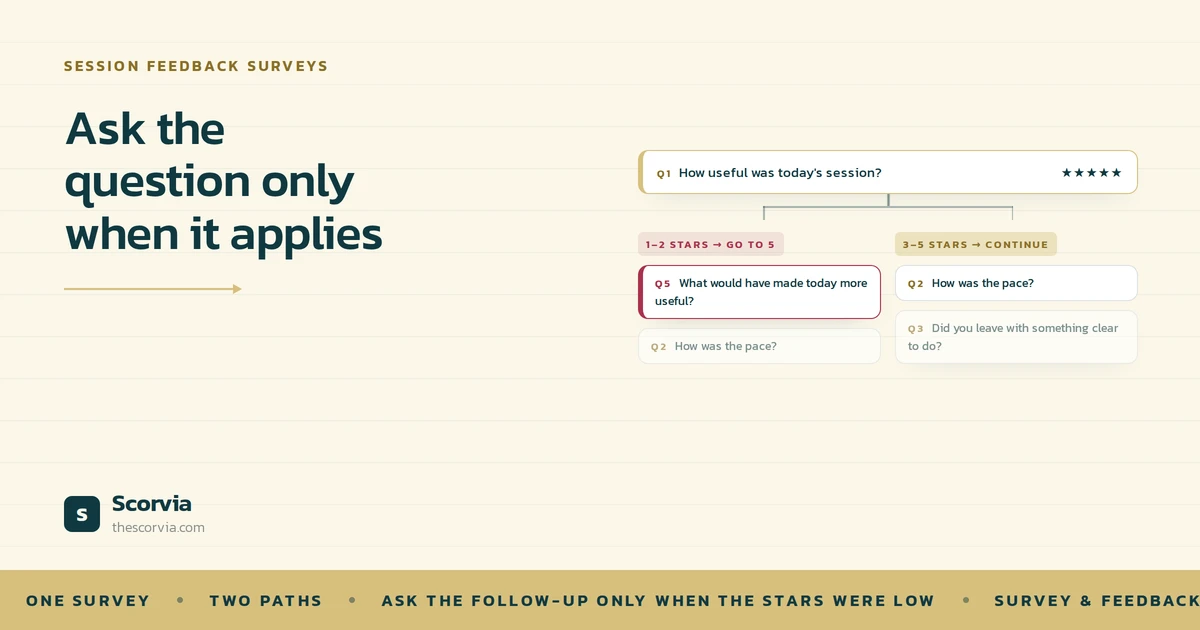
In session feedback survey the answers are star ratings, so the rule is easy to write. One or two stars: ask what would have made the session better. Three to five: carry on. One rule, two paths.
Why use it?
Think about a good mechanic. You say there is a noise. They ask when it started, whether it changes with speed, whether it stops when you break.
They do not ask any of that from the customers who came in for a type. Same mechanic, same knowledge, different questions because the questions depend on what you said first.
A survey without branching is a mechanic who asks every customer about the noise. Most answer politely and briefly, because there is no noise. The one customer who does have noise gets the same three seconds as everyone else.
That is what happens when you send ten fixed questions after every session. The happy client clicks five, five, five. The unhappy client clicks two and is then asked the same questions as the happy one, none of which is “what went wrong?”
Branching fixes both halves. The happy client answers fewer questions and finishes. The unhappy client is asked the one question that matters, while the reason is still fresh.
The survey gets shorter for most people and more useful for the rest. That is the whole trade.
How to tell when a question should branch
Here is the test. Write the follow-up you want to ask. Then ask: does it make sense for every possible answer to the question before it?
If yes, it does not need a branch. Put it next in order. “How was the pace?” makes sense whatever someone said about the room.
If no, that is a branch. “What would have made it better?” only makes sense after a low rating. After five stars it is faintly insulting. That question needs a rule in front of it.
Most surveys have exactly one question that fails the test, and it is always that one. That is not a limitation. A survey with one well-placed branch is doing everything branching is for.
Where branching lives in Scorvia's survey builder
In Scorvia, a feedback survey is a template you build ahead of time, marked for a session type one-to-one or group and a format, virtual or in person.
The questions are star ratings from one to five; in the order you set. Reorder, duplicate or delete any of them. Every survey ends with a free-text comment box.
Branching is a switch on the template. Turn it on, and each question can carry rules by star range:
| If the client gives | Then go to |
|---|---|
| One or two stars | The question you name usually a follow-up about what would have made it better |
| Three to five stars | The question you name usually the next one about the session |
| Any range no rule covers | Simply the next question in order |
The last row is the one to notice. You are not asked to write a full decision tree. Write a rule for the case that changes the next question and let everything else fall through.
You also choose which question the survey starts on, so the first thing a client sees is the thing you most want rated.
The template goes out from the prompt that appears when you mark a session complete or later, from the Sent surveys page. Answers come back to one Feedback page: your average, the spread across one to five, and every comment, split into positive and critical. Nothing is published anywhere. It is private to your account.
A closer look: the two-star path
Take a five-question survey for a one-to-one virtual session. Four questions rate the session; one is the follow-up. Here is the whole thing, rule included:
| # | Question | Rule |
|---|---|---|
| 1 | How useful was today's session? | 1–2 stars → go to 5. Anything else → continue |
| 2 | How was the pace? | — |
| 3 | Did you leave with something clear to do? | — |
| 4 | How was the video call itself? | — |
| 5 | What would have made today more useful? | Follow-up. Reached only from question 1 |
A client who rates the session four stars answers one to four, then the comment box.
A client who rates it two stars is taken straight to question five, while the reason is still in their head. Then they continue.
One rule. Two experiences of the same survey. The second one is the conversation you would have wanted to have.
Notice what the rule does not do. It does not skip the pace question for the unhappy client, and it does not ask the happy client what went wrong. It changes one thing: what comes right after a low rating.
With great power: four rules for branching well
Branching is easy to add and easy to overdo. Keep these four in mind.
Branch on the answer that changes the next question
A low rating needs “what would have made it better”. A high rating does not. If every answer leads to the same next question, there is nothing to branch on.
One or two branches per survey, not one per question
Every rule is a path a client might take and a path you have to read. Two rules feel attentive. Six feel like a maze.
Let the uncovered ranges fall through
You do not need a rule for every star range. Anything a rule does not cover goes to the next question in order.
Let the comment box catch the rest
Branching handles the answers you predicted. The free-text box at the end of every survey handles the ones you did not.
One survey, one or two branches, and a comment box at the end. Everything else is ordering.
Common questions
What is conditional branching in a feedback survey?
A rule that picks the next question based on the answer just given. In session feedback survey the answers are star ratings, so a rule reads: one or two stars, go to the follow-up; three to five, carry on.
Does branching make a survey longer or shorter?
Shorter for most clients, and more useful for the rest. A five-star client skips the “what went wrong” question. A two-star client is asked it once, while they still remember.
How many branches should a session feedback survey have?
One or two. The useful one is nearly always the same: a low rating opens a follow-up about what would have made the session better. If you are writing a rule for every question, the survey needs fewer questions, not more rules.
What happens to star ratings does not cover?
They continue to the next question in order. You never have to write a full decision tree cover the one case that changes the next question and let everything else fall through.
Can I see which path a client took?
You see every answer they gave. Every rating and every comment lands on the Feedback page in your workspace, with comments split into positive and critical. If a client took the low-rate path, their follow-up answer is there with the rest.
Branching is one part of the survey and feedback builder in Scorvia. Templates by session type, the send prompt at session completion and the Feedback page are on the feature page.
Build one template with one branch, mark a session complete, and see the prompt appear. 14-day free trial, no card see /features/survey-feedback-builder, or /pricing.