An AI plan builder for coaches turns what a client should do between sessions into a plan the client follows in their own calendar. You set the goals and the actions under them, the AI can write the first draft from the client's history, the plan is sent and locked, and progress comes back to you as the client ticks each item off. In Scorvia this is the AI-Driven Plan Builder, part of the same workspace as the AI-driven assessment software.
The question coaches are asking
The question is whether an AI plan builder is anything more than a to-do list with a chatbot attached.
It is a fair thing to ask. Most coaches already have a way of telling a client what to do next, and it usually works until the client leaves the room.
The answer turns on three things: where the plan lives, whether it can change under the client, and what comes back to the coach. This post takes them in order.
The problem: the plan lives everywhere except the client's week
The problem is that the actions agreed in a session have nowhere to live. They end up in the coach's notes, an email, a chat thread, or a document the client opened once.
So the client has to remember them. A task meant for Tuesday evening competes with everything else on Tuesday evening, and nothing reminds them.
The coach has to chase. A message mid-week asking how it is going is the only progress report, and the next session opens with the question of whether anything got done.
And the plan drifts. Actions get added by message, deadlines move, and after three weeks the client and the coach are working to different versions of the same plan.
If you have read why coaches need more than an assessment builder, this is the step after the report: the client knows where they are, and nothing structured happens next.
💡 Note: A to-do list fixes the first of these at best. It does nothing about drift, and nothing comes back to the coach.
The solution: a fixed plan in the client's own calendar
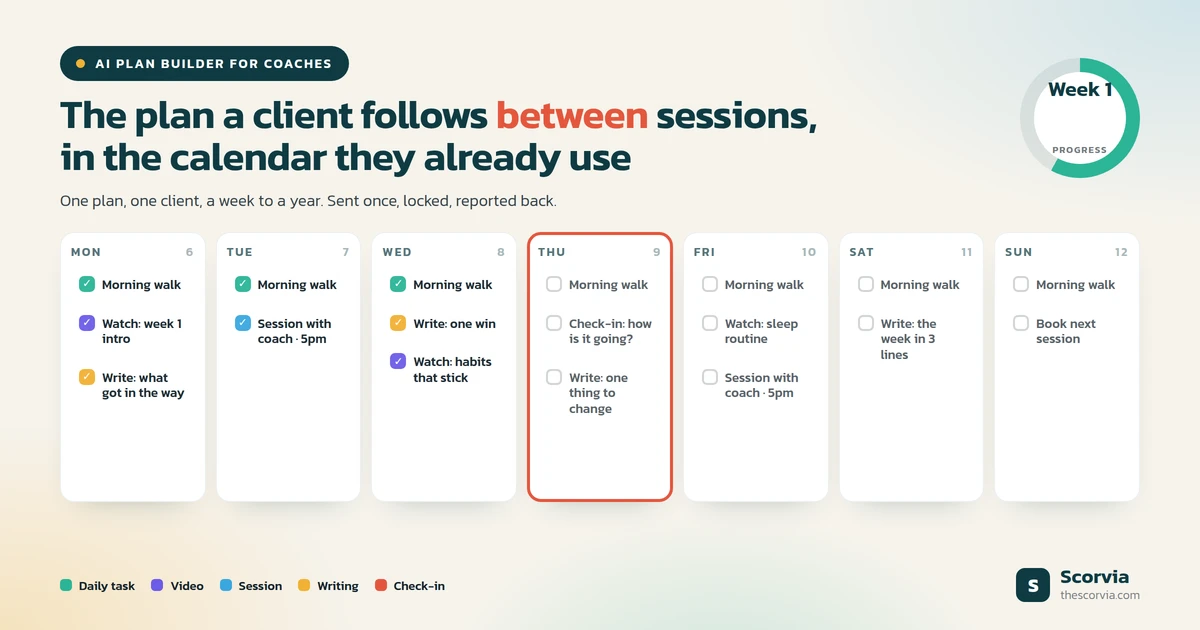
The solution is a plan for one client, over a fixed length of time, that lives in the calendar the client already uses and reports back to the coach. That is what the AI-Driven Plan Builder is.
It lives in the client's calendar. The plan is shown in the same calendar the client books sessions in, so there is no second app to open and no document to find.
It does not change under the client. Once sent, the goals, tasks and dates are fixed, and the plan only records progress from then on.
And it reports back. Every tick, note, photo and check-in lands on the coach's side, with a progress chart over time.
How an AI plan builder works
It works in six steps, from choosing the client to reading what comes back.
- Pick the client and how long the plan runs
A plan belongs to one client and covers a fixed stretch: a week, a month, a quarter, a year, or any custom length up to 52 weeks. Answer those two questions and the plan exists.
- Start with a draft, a past plan, or a blank page
The AI can write a first draft from that client's own history. You can also copy any plan you have sent before, or build from nothing. The AI draft never sets dates and never chooses a video.
- Set the goals, and what the client does under each
Every plan is a set of goals. Under each goal go the actions: a daily task, a video to watch, a session with you, or something to write.
- Decide how each task repeats
Daily, on weekdays, on the days you choose, or a number of times a week, with a time of day if it matters. Tasks can be limited to certain weeks, or set as one-offs that stay on the list until done.
- Send it, and it locks
Once sent, goals, tasks and dates stop changing. The plan appears in the client's calendar, the same one they book sessions in, and from then on it only records progress.
- Read what comes back
Goals achieved, sessions done, tasks completed, check-ins answered, a progress chart over time, and the notes and photos the client attached to their tasks.
What the AI does, and what it leaves to you
The AI's part is the first draft, and only the first draft. It writes a starting plan from that client's own history, and you edit it.
It never writes dates. When a task falls, which weeks it runs, and how often it repeats are your calls.
It never picks a video. If a goal needs the client to watch something, you choose what.
That is the same division as in the rest of the workspace: the AI drafts the assessment report, and the coach approves it. Here the AI drafts the plan, and the coach sends it.
Why a sent plan is locked
A sent plan is locked so that a client never finds the plan they are working to has changed under them.
Goals, tasks and dates stay as sent. If the plan needs to be different, you send a new one, and Scorvia tells you first and offers to finish the running plan, keeping everything the client did on it.
What stays live is everything around the plan: reminder settings, bookings, check-ins and progress all carry on.
A plan in notes versus a plan in a plan builder
The difference is clearest side by side.
| Question | Plan in notes, email or chat | AI-Driven Plan Builder |
|---|---|---|
| Where does the client see it? | Wherever they saved it | In the calendar they book sessions in; open a day, see what is due |
| Does anything remind them? | Only the coach | Reminders about what is due; check-ins on a set cadence, the last on the plan's end date |
| Can it change mid-plan? | Constantly, by message | No. Sent plans are fixed; a new plan finishes the old one and keeps its record |
| What does the coach see? | Whatever the client reports | Goals achieved, sessions done, task completion, check-ins, a progress chart, the client's notes and photos |
| What does the client see? | The same notes | One progress number and what they last reported |
| Can the team reuse it? | By copying a document | Every sent plan is a blueprint with dates stripped; teammates see shape and author, never the client's name |
The last three rows are the ones a to-do list cannot match, because they depend on the plan being a record, not a list.
Where sessions fit
Sessions are booked from inside the plan, into your real availability. You open your month, pick a day, and book a slot, and if nothing is published for that day you can open new time on the spot. The plan and the session calendar are one view.
Who an AI plan builder is for
It is for any coach whose clients are expected to do something between sessions.
Life, executive, health, career, business, HR and behavioural health coaches, and financial advisors with a client discovery process, all build the same shape of plan. The goals and the actions change with the field; the mechanism does not.
Because the plan builder sits inside AI-driven assessment software, the plan can follow an assessment and its report. The report says where the client is; the plan says what to do about it.
Frequently asked questions about AI plan builders
What is an AI plan builder for coaches?
An AI plan builder is the part of coaching software that turns what a client should do between sessions into a plan the client follows in their calendar. The coach sets the goals and the actions under them, the AI can write the first draft from the client's history, and progress comes back to the coach as the client ticks each item off. In Scorvia it is the AI-Driven Plan Builder, part of the same workspace as the AI-driven assessment software.
What problem does a plan builder solve?
The gap between sessions. Agreed actions usually live in session notes, an email or a chat thread, so the client has to remember them, the coach has to chase them, and the next session opens with whether anything got done. A plan builder puts the actions in the client's calendar with reminders and brings the record of what happened back to the coach.
Does the AI write the whole plan?
It can write a first draft from that client's own history, and the coach edits it. The draft never writes dates and never picks a video; those stay with the coach. A coach can also start from a plan they have already sent, or from an empty plan.
Can a coaching plan be changed after it is sent?
No. Once sent, the goals, tasks and dates are fixed and the plan only records progress, so a client never finds the plan they are working to has changed under them. Reminder settings stay adjustable, and bookings, check-ins and progress continue.
What does the client see?
Their plan as a calendar, the same calendar they book sessions in. They open a day, see what is due, and tick it off in one tap, adding a note or a photo where the coach has asked for one. They also see one progress number and what they last reported. By default only three things are emailed: the plan being assigned, a week-ahead summary, and the plan finishing.
Can a coaching team share plans?
Yes. Every sent plan becomes a blueprint with the dates stripped, and colleagues can reuse each other's. A teammate's plan shows only its shape and author; the title and client name are withheld, because plan titles name clients.
Everything described here is on the AI-Driven Plan Builder page, alongside the rest of the Scorvia workspace.
💡 Note: Build a plan for one client and send it. 14-day free trial, no card. See the plan builder, or check pricing.