You turn a client assessment into a coaching action plan by reading the approved report, building one goal for each key finding, and turning each recommendation into an action the client can do between sessions: a daily task, a video, a session, or something to write. Set how the habits repeat, book the sessions, send the plan, and read what comes back. In Scorvia the report comes from the AI-driven assessment software and the plan is built in the AI-Driven Plan Builder, in the same client record.
Why the report is not the plan
The report is not the plan because a report describes where a client is, and a plan says what they do next.
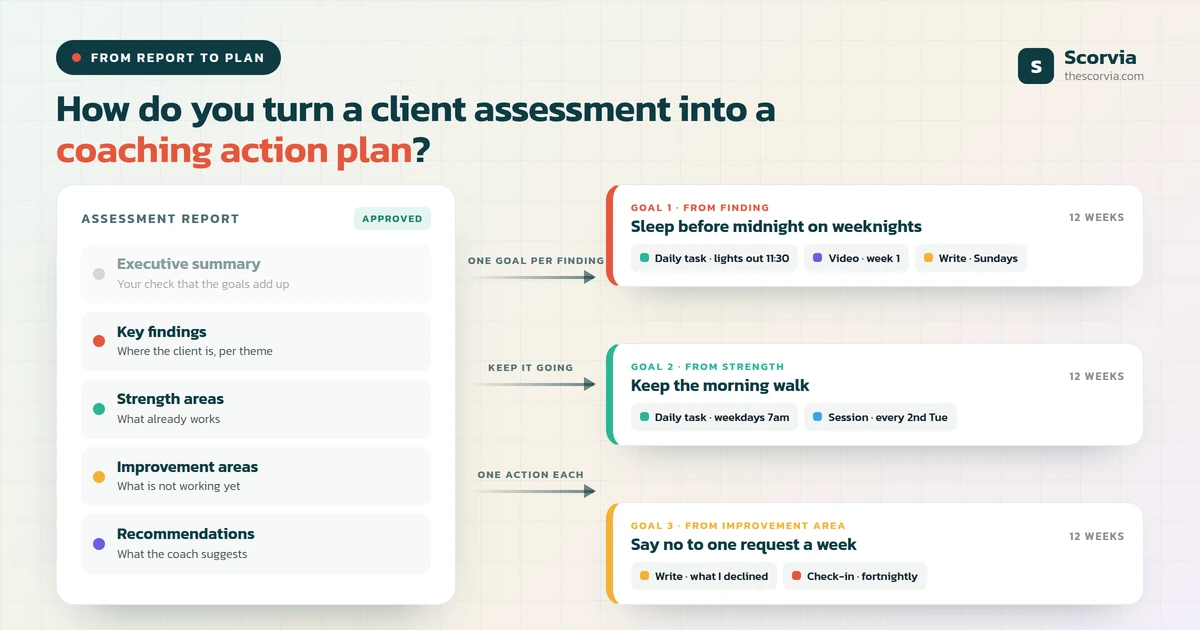
An approved assessment report has five sections: an executive summary, key findings, strength areas, improvement areas and recommendations. Every one of them is about the client as they are today.
A plan has a different shape. It is made of goals, and under each goal sit the things the client actually does between sessions.
The work of turning one into the other is the coach's. It is also the step most often skipped, which is why a good report so often ends up as a PDF the client read once.
What a coaching action plan is made of
A coaching action plan is made of goals and the actions under them. That is the whole structure.
A goal is where the client is going over the life of the plan. There should be few of them, and each should trace back to something the report found.
An action is one of four things: a daily task, a video to watch, a session with the coach, or something to write. If a recommendation cannot become one of those, it is advice, and advice does not go in a calendar.
Everything else, the length, the repeat rules, the check-ins, the reminders, is scaffolding around those two layers. The AI-Driven Plan Builder is built in exactly that shape.
How to turn the report into the plan, step by step
Seven steps, in the order you do them.
1. Start from the approved report, not from memory
Open the report you approved: the key findings, the strength areas, the improvement areas and the recommendations. Those four sections are the raw material for the plan.
2. Choose the client and the length
A plan is for one client over a fixed stretch: a week, a month, a quarter, a year, or a custom length up to 52 weeks. Match it to how long the recommendations need, not to the next invoice.
3. Let the AI draft, then cut
Ask for a first draft from that client's own history, or copy a plan you sent to a similar client. Keep the goals that match the findings and delete the rest. The draft never sets dates or picks videos; that is the next step.
4. Turn each finding into one goal
A finding describes where the client is. A goal says where they are going. One goal per finding keeps the plan readable, and a plan the client can read is a plan they can follow.
5. Turn each recommendation into an action under its goal
Under each goal go the things the client does: a daily task, a video to watch, a session with you, or something to write. A recommendation that cannot become one of those four is advice, not a plan.
6. Set how habits repeat, and leave one-offs open
A habit repeats every day, on weekdays, on chosen days, or a set number of times a week, with a time of day if it matters. A one-off stays on the list until it is done. Limit a task to particular weeks when it should not start on day one.
7. Put the sessions in, then send
Book the sessions from inside the plan into your real availability, send it, and it locks. From then on the plan records progress, check-ins come back on the cadence you set, and the last check-in falls on the end date.
Which report section becomes which part of the plan
The mapping is nearly one to one, which is what makes the method quick.
| Report section | What it says | Where it goes in the plan |
|---|---|---|
| Executive summary | The client in a paragraph | Nowhere directly; it is your check that the goals add up to the summary |
| Key findings | Where the client is on each theme | One goal per finding |
| Strength areas | What already works | A daily task that keeps it going, so the plan is not only about gaps |
| Improvement areas | What is not working yet | A written task each week on that area, and a video where one exists |
| Recommendations | What the coach suggests | The actions under each goal: task, video, session or writing |
| Overall score and chart (scored assessments) | A number out of 100 at the start | The baseline the next assessment is compared against; not a goal in itself |
Read the strength row again. A plan built only from improvement areas tells the client everything is wrong, and that is not what the report said.
Four mistakes that make a plan fail
Too many goals. A client cannot hold eight goals in their head, and the plan builder will happily let you add eight. One per finding, and cut the finding if it does not earn a goal.
Tasks with no time. 'Walk more' is a wish. 'Walk, every weekday, 7am' is a task the calendar can show and the client can tick.
Changing the plan mid-way. Once sent, a plan in Scorvia is fixed on purpose, because a plan that keeps moving teaches the client it does not matter. If it needs to be different, finish it and send a new one; nothing the client did is lost.
Ignoring the check-ins. The check-in answers are the client telling you what the next session should be about. Read them before the session, not during it.
What the AI does in this, and what it does not
The AI's part is the first draft and nothing after it. It drafts from that client's own history, and you edit.
It never sets a date, and it never picks a video. Those are the two decisions that make a plan fit a client, and they stay with you.
That is the same division as on the assessment side. The AI-driven assessment software drafts the report and you approve it; the plan builder drafts the plan and you send it.
Where the sessions go
The sessions go inside the plan. You open your month, pick a day and book a slot into your published availability, and if nothing is open that day you can open new time on the spot. The plan and the session calendar are one view for the client, so a session is just another item on the day it falls.
What comes back
What comes back is the evidence for the next session. Goals achieved, sessions done, task completion, check-in answers, a progress chart over time, and the notes and photos the client attached.
The client sees less, deliberately: one progress number and what they last reported. The detail is for you.
When the plan ends, the last check-in lands on the end date. That is the moment to send the next assessment, which gives you the next report, which gives you the next plan. If you want the feature itself explained from the start, what is an AI plan builder for coaches does that.
Common questions
How do you turn a client assessment into a coaching action plan?
Read the approved report, choose how long the plan runs, and build one goal for each key finding. Under each goal, turn the report's recommendations into actions the client can do between sessions: a daily task, a video, a session, or something to write. Set how the habits repeat, book the sessions, send the plan, and read what comes back. In Scorvia the report is drafted by the AI-driven assessment software and the plan is built in the AI-Driven Plan Builder, in the same client record.
What should a coaching action plan include?
Goals, and the actions under each goal. The actions are the things a client actually does: a daily task, a video to watch, a session with the coach, or something to write. A good plan also has a fixed length, a repeat rule for every habit, and a way for progress to reach the coach without the coach asking.
How long should a coaching action plan run?
As long as the recommendations need. A week, a month, a quarter, a year, or any custom length up to 52 weeks. A short plan with a clear end date is easier to finish than an open-ended one, and the last check-in on the end date gives the next assessment a natural starting point.
Can the AI write the action plan from the assessment?
It can write a first draft from that client's own history, which the coach edits. The AI draft never writes dates and never picks a video; the coach decides when each task falls and what the client watches. The coach can also start from a plan sent to a similar client, or from an empty plan.
What happens if the plan needs to change?
A sent plan does not change. Its goals, tasks and dates are fixed so the client never finds the plan they are working to has moved. If the plan needs to be different, the coach sends a new one; Scorvia tells the coach first, offers to finish the running plan, and keeps everything the client did on it.
How does the coach know whether the client is following the plan?
Progress comes back on its own. The coach sees goals achieved, sessions done, task completion, check-in answers, a progress chart over time, and the notes and photos the client attached to tasks. The client sees one progress number and what they last reported.
The method above runs end to end in Scorvia: the report is drafted when the client submits, and the plan is built from it in the same client record. See the whole workspace.
Take one approved report and build its plan. 14-day free trial, no card see the plan builder, or pricing.